Case Study: Macro Snowflake Photos

Case Study: Macro Snowflakes Photos

Russian photographer Alexey Kljatov tapes a $50 lens to his cameras and takes the most stunning macro snowflakes photos I have ever seen. Check out his work and learn the technique used to get such amazing result.

For more about Alexey Kljatov visit facebook.com/pages/Chaoticmind75 and chaoticmind75.tumblr.com.

The Photos

This is postprocessed snowflakes, cropped from full 12mp shots, mix from 2009-2013 years. Usually i add to them artifical colors, because original shots almost monochromatic and looks not appealing. Some snowflakes captured in standard macro mode, others with Helios 44 add-on:


Case Study: Macro Snowflakes Photos


Case Study: Macro Snowflakes Photos


Case Study: Macro Snowflakes Photos


Case Study: Macro Snowflakes Photos


Case Study: Macro Snowflakes Photos


Case Study: Macro Snowflakes Photos


Case Study: Macro Snowflakes Photos


Case Study: Macro Snowflakes Photos


Case Study: Macro Snowflakes Photos


Case Study: Macro Snowflakes Photos

Case Study

I capture snowflakes at open balcony of my house, mostly on glass surface, lighted by LED flashlight from opposite side of glass, and sometimes in natural light, using dark woolen fabrics as background.

On a floor of a balcony I put the turned stool (legs up), on them – a glass plate. Previously, i shoot using Canon A650’s standard macro mode. For this, from a small plastic bottle I cut central cylindrical part in the form of a tube (height 5.5 cm). This height I picked up so that the lens of the camera, pushed in a tube, will be at distance 1 centimeter from the bottom (this is minimum focusing distance of Canon A650 in macro mode). I just put this cylinder with the camera’s lens within it over the chosen snowflake, the lens looks vertically down. For steady shots, i shoot in small series with starting delay 1-2 seconds after focusing, taking away my hands off the camera. With free hand i illuminate snowflake with flashlight from under the glass. The flashlight shines through two layers of white plastic bag for more uniform lighting. This is enough for shooting even at night with minimum ISO and short exposure time.

Recently, i built simple macro addon for the camera. I used lens Helios 44M-5 from old USSR SLR camera Zenit (here is short description in wikipedia). At first, i attached these lens at narrow wooden board (around 30 cm long), reversed: a back lens to snowflake, front lens to camera, and drilled in a board an opening for a screw suitable to tripod nest of the camera. Then camera is put on a board so that the lens in the maximum optical zoom mode (6x) touched Helios lens and looked straight into them. I attach the camera by a screw and additionally with metallic bracket, glued to the board, it holds opposite side of camera, so it didn’t move anywhere. On Helios’s back side (which is front of whole construction) i attached three standard narrow extension rings from Zenit camera (this is needed only in case of shooting at glass surface with backlight). This holds lens at needed focusing distance from the glass with snowflakes (2,5-3 centimeters). Place of connection between internal and external lens i covered with some sort of skirt, maked from black plastic bag: this protects connection point from outer light, snow, ice and waterdrops. All design turned out rather strong and steadily stands vertically with lenses looking down. I simply put it on glass over the chosen snowflake and shoot at maximum optical zoom instead of macro mode. Camera’s autofocus works well.

This is assembled construction:


Case Study: Macro Snowflakes Photos

Ready for shooting:


Case Study: Macro Snowflakes Photos

Simple scheme of add-on:


Case Study: Macro Snowflakes Photos

This is an example shots in two modes, standard A650 macro mode and with external lens:


Case Study: Macro Snowflakes Photos

I also wrote separate article about averaging identical shots. I used this technique for all recent snowflakes.

For more about Alexey Kljatov visit facebook.com/pages/Chaoticmind75 and chaoticmind75.tumblr.com.

Posted in Blog | Comments Off on Case Study: Macro Snowflake Photos

7 Best Practices of Responsive Web Design

Advertise here with BSA

Considering the rate at which the mobile web is growing, it’s becoming crucial that your website be ready to accept visitors who are coming in from a widely assorted array of different devices and screen sizes.

This is where responsive design can come into the picture and save your day nicely. However, with responsive design, as with anything in website design, you need to make sure that you follow along with some crucial best practices if you want your responsive site to actually work well and provide the flexibility it’s supposed to.

Mobile Users Deserve the Same Quality of Browsing Experience

7 Best Practices of Responsive Web Design

One of the first and foremost principles to keep in mind when creating a responsive design site is making sure that the site is built so that the browsing experience is evenly the same for all users across the board.

This means that your site’s appearance and visual structure should change without ever creating content and function losses for users of any specific device or screen size. A visitor accessing your pages from their desktop should be getting the same sort of browsing experience as a visitor coming in through their smart phone or their tablet.

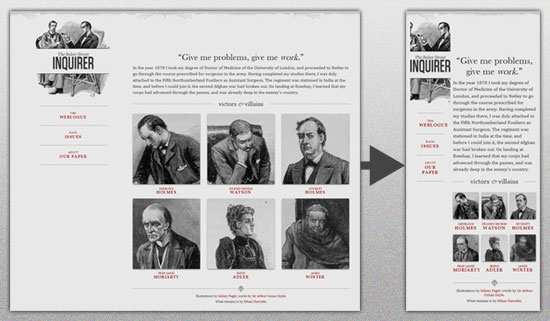
This means flexible everything and requires that you ensure all of your image, content and grids are fully fluid and will reconfigure accordingly on a wide assortment of screen sizes, such as these, which are only a small sampling of the very most popular screen sizes you’re likely to deal with.

The result should be a site that converts as nicely as this example does.

7 Best Practices of Responsive Web Design

Design your Site with Responsive in Mind

When you’re wire framing your site layout together for coding into a real design, understand that there are layouts which are ideal for responsive design and those which are not, meaning there are designs that convert to assorted new sizes better than others thanks to their layout.

This means designing as simple a site layout and HTML code as possible and using simple mechanisms for core elements such as navigation and menu options, using HTML5 guidelines and doctype, and a simple overall core layout.

What you should avoid completely are things such as overly complex divs, useless absolute positioning, and fancy Javascript or Flash elements that will just complicate site adjustment on the whole.

Pay Attention to your Breakpoints

Resolutions can be defined in an assortment of breakpoints, but there are several major sizes that you need to focus on more than any others. These being:

<768px, which is ideal for larger smartphones and smaller tablets >768px, which applies for everything bigger such as large tablet screens and desktops screens.

Also, these can be used too if you’ve got the energy and time:

<320px, which is great for older small, low res phones >1024px stylesheet for wide screens on desktops.

These are the key breakpoints to focus on and especially the first three as well as the full desktop resolution, which is greater than 1024px.

Make your Images Flexible and Workable

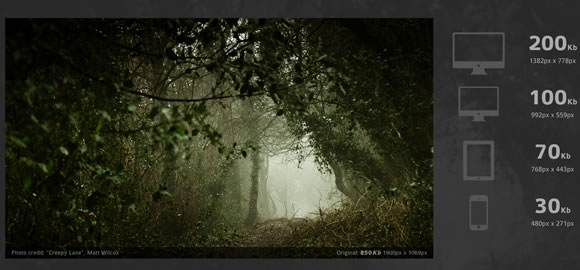
With a simple design, you can make your images flexible as well to a certain degree. The easiest way to accomplish this is by simply using adaptative sizing and resizing their width.

You can do this in a variety of ways, but one of the easiest methods through which to achieve it is with this handy little tool: Adaptive Images. Bear in mind that sizing accordingly for mobile users is probably your best bet on a responsive design site if you want decent load speeds, which are absolutely crucial.

7 Best Practices of Responsive Web Design

You could also use variable breakpoints and store multiple image sizes in your data for different screen resolutions, but this might become a problem in terms of bandwidth usage, and you cannot create your site with the safe assumption that all of your viewers will have access to powerful bandwidth.

Allow Compression of Site Elements and Content

Use a program such as GZIP to compress your page resources for easier transmission across networks. You’ll have lowered the number of bytes sent per page or element and made your content easier to browse and access from devices with varying or low bandwidth.

Furthermore, you can speed things up even further by removing any unnecessary white space and line breaks. Doing this will reduce file sizes overall and keep things flowing more smoothly.

Get Rid of Non-Essential Content

In order to make your mobile friendly responsive design site really shine in a very easy to achieve way, simply bear one thing in mind: Some content and content elements were never meant to be used in a mobile context and would never work there.

7 Best Practices of Responsive Web DesignImage by Trent Walton

If you have these elements at play in your website or potential site layout, then get rid of them immediately for any mobile setting. You can do this by adding a .not_mobile class to specific elements that you’d like to see removed when your site is viewed in a mobile context or you can simply get rid of such elements permanently from all versions of your site.

Remember the Bottom Line

The above are just some of the major best practices you can try out, some of the more important ones.

Ultimately however, if you want your responsive design site to work well, you need to build it so that it can load and function quickly on devices that will often have low resolution, small processing power and sometimes weak bandwidth access. This means a simple, well organized site that conforms to its core function with maximal focus.

Posted in Blog | Comments Off on 7 Best Practices of Responsive Web Design