Keyword optimization is a well-known strategy for helping people find your content, both through search engines and when searching within a website. But did you know that by following SEO best practices you could also be making your website greener? That’s because web servers and devices that consumers use to browse the internet both use electricity. A lot of electricity. And most electricity is generated by sources that are not renewable or clean.
The more findable content is, the less irrelevant content a person needs to go through to find what they are looking for. Fewer pages loaded means fewer server requests are being made, and that fewer photos and videos are being loaded. In some cases, the customer may also end up spending a little less time on their phone, tablet or computer. All of that results in tiny energy savings, and those savings add up.
Now that you understand the connection between findability and sustainability, let’s take a detailed look at how to improve the findability of content through page level keyword optimization, a popular SEO technique.
Keyword Optimization: Where to Place Focus Keywords
In order to optimize a page for a focus keyword, you need to place it in a number of different places on a page. With the exception of your homepage or landing pages where you may need to optimize for several keywords related to your products and service offerings, in general, you want to optimize a page for a single keyword or keyword phrase.
After you’ve selected a focus keyword for a page, here is where you need to place it:
In the Title Tag of Each Page
The first place that you want to put your focus keyword or keywords is in the title tag of each page.
Examples of an optimized title for a homepage:
- Electronics, Cars, Fashion, Collectibles, Coupons and More Online Shopping | eBay
- Shoes, Clothing, and More | Zappos.com
- Shop clothes for women, men, maternity, baby, and kids | Gap
Examples of an optimized title for a subpage:
- Electronics | eBay
- Popular Men’s Shoe Styles | Zappos.com
- Womens Clothes: jeans, tops, skirts, dresses, pants | Gap
Optimized title tags have certain characteristics:
- Avoid the use of duplicate title tags: Every page should have a unique title so that your pages are not competing with each
other for relevance. - Optimized titles should be 70 characters or less.
- Put company name at the end of your title tag to help build brand awareness.
- Use consistent punctuation across all page titles in between your keyword and company name.
- Balance keyword usage with usability, considering what language would be most compelling to the reader.
In the Description Tag of Each Page
The next place that you want to put your focus keyword(s) is in the description tag of each page. This is the brief description that shows up in search results, or when you share a page on Facebook or LinkedIn. While this description should be written for humans and not for search engines, you should include your keyword at least once. Write your descriptions in plain English, using compelling language that would make a customer want to click on a link. Optimized page descriptions should be 150 characters or less. Longer descriptions will be truncated in Google with an ellipses (…).
In the Main Body of your Content
Include your focus keyword 2-3 times, including once in the first paragraph of the page. In general, search engines are going to read things that appear in order first and they may or may not get around to reading things that appear lower on a page. It’s recommended that copy on each page be a minimum of 300 words for SEO purposes.
In a Heading within the Article
Headings, which are often labeled “Heading 1, Heading 2, Heading 3″, etc. or “H1, H2, H3″ in a content management system, help summarize a page’s contents.
Headings should be written to both include focus keywords, and to summarize what comes next. This helps people, and spiders, scan a page quickly to see what’s most relevant to them. It’s also an accessibility best practice, because screen readers enable visually impaired people to jump from heading to heading so that they can quickly get to the section that’s most relevant to them. When you think about it, the spiders that crawl websites also can’t see: they can’t see photos, multimedia content, or fancy font styles on a page. So it makes a lot of sense that SEO best practices are also often accessibility best practices.
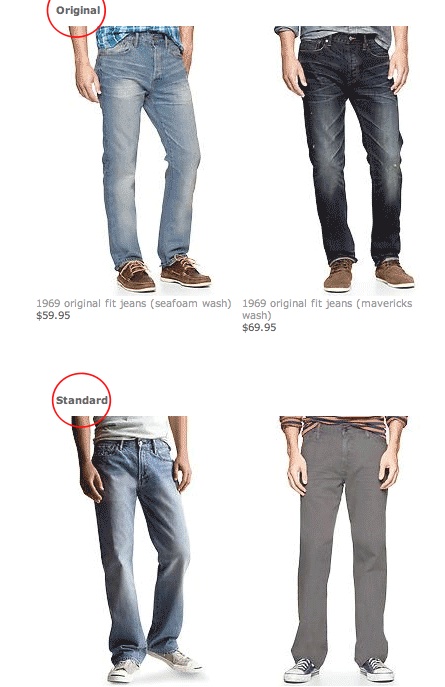
This example from the Gap shows headings that help customers navigate to the style of jeans that they’re looking for.
Within your Page URL
Another place that you should put your focus keyword is within the URL of your page. Here’s an example from this post:

In this example, we’ve optimized the URL for the terms “SEO,” “keywords,” and “sustainability.”
Sometimes it’s not practical to include your keyword in the URL of each page. That’s okay. Your URLs should be short, descriptive and human-friendly, helping the reader (and spider) accurately predict what’s on that page. I recommend using hyphens to separate words instead of underscores. Avoid special characters (such as smart quotes or ampersands), which can break URLs. For that reason, whenever possible, try to configure your content management system so that you can manually edit your URLs instead of having them generated automatically from the headline of the page.
Within Image ALT Tags
As I mentioned above, search engines cannot “see” photos or multimedia content, so a number of accessibility best practices are also SEO best practices. When writing an alt tag for an image you should write a short sentence that describes the content of the photo, both for people and for spiders. Whenever it is practical and appropriate to your human readers, you should also include focus keywords in your alt text.
Note that when an image contains text, the alt tag should include a copy of that text so that visually impaired individuals and spiders can read the text. Put your keyword phrase as close to the beginning of your alt tag as possible. Similarly, videos should also be labeled with appropriate meta information such as a clearly written title and description (if not a transcript of the video) in order to be understood by a search engine.
Keyword Optimization: Put it into Practice
I hope that this article has given you a practical understanding of how to do page level keyword optimization. By following these best practices you will yield a number of benefits: driving traffic to your site, making your content more findable, improving accessibility and reducing your website’s carbon footprint.
 I’m honestly a bit wary of making a simple, flat declaration that “x is the best program for y”; real life is usually trickier than that.


