HTML5, together with CSS3 and responsive design are the new buzz around web technologies these days. This article will help you get started using HTML5 on your projects today and show you some good practices to put what you learned to good use.
Lets see a typical HTML5 page markup:
<!doctype html>
<html>
<head>
   <title></title>
</head>
<body>
   <header>
       <h1></h1>
       <nav>
           <ul>
               <li><a href="#">link 1</a></li>
               <li><a href="#">link 2</a></li>
               <li><a href="#">link 3</a></li>
           </ul>
       </nav>
   </header>

   <section>
       <article>
           <hgroup>
               <h1>Post title</h1>
               <h2>Subtitle and info</h2>
           </hgroup>
           <p>Content goes here.</p>
       </article>
       <article>
           <!-- Another article here -->
       </article>
   </section>
   <aside>
       <!-- Sidebar here -->
   </aside>
   <footer></footer>
</body>
</html>
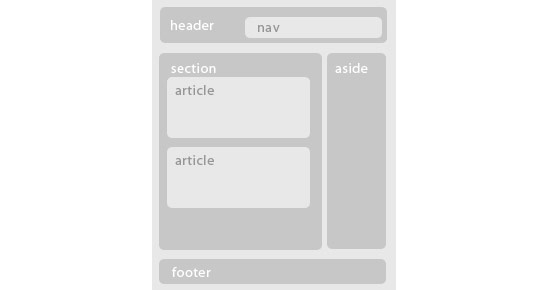
With some styling the structure of our page will be like the image below
Doctype
If you come from an HTML 4 or XHTML background, the first thing you might have noticed on the sample markup above, is the new doctype declaration. Really simple, just type it as you see it. And no reasons to worry, it is backwards compatible with all browsers. You can actually change it right now on all your html pages.
Apart from the new simple doctype declaration, you will see many new tags. Most of them are pretty much self explanatory but lets see them in detail.
Block level Elements
In HTML5 we no longer have to resort to “div-itis” to give structure to our page. We have a great selection of new block level elements that help us to create a semantic structure quickly and of course our code becomes more readable and maintainable.
With the new structural elements we can begin to forget about <div id=”header”> and <div id=”footer”> and start using the new <header> and <footer> tags. They work the same as a div but hey, less writing, more semantic code. We are also introduced to other new elements such as <section> <article> <nav> <aside> <hgroup> <figure> and <figcaption>.
The use of <header> and <footer> is obvious. The <nav> tag specifies the navigation links of our page instead of having <div id=”navigation”>. <aside> refers to a section of the page that is separated from the main content. It is mostly used for sidebars today, though some developers suggest it could be used to contain some secondary information for example, for articles.
<section> is used to give structure to our page and contain parts related to a certain theme while <article> can contain a blog post, news post, comment etc. A <section> can contain many <article> elements and an <article> element can contain many <section> elements.
We also have a new container for our headings <h1> to <h6> which is the <hgroup>. Finally we have a <figure> element which is container for a representational image, related to the content but its presence is not mandatory. The <figure> element can also contain a caption using the <figcaption> element.
Inline Elements
HTML5 introduces some new inline elements too. <time> and <mark> are a couple of these new ones that help to make our markup even more semantic.
<time> is used to display time semantically. You can choose to display time, date and both. Example below
<time datetime=”20:00”>8pm</time>
<mark> is used to highlight parts of content for example when a user searches for a specific term. Its difference from <strong> or <em> is that it gives no special meaning or importance to the content it highlights.
Media Elements
HTML5 also brings us some new media elements. We have <audio>, <video> and <embed> tags together with the <source> tag to specify media sources. The simplest way to use them is below
<!-- simple audio use -->
<audio src="audio-file.ogg" controls>
</audio>

<!-- simple video use with multiple sources-->
<video controls>
   <source src="video-file.mp4" type="video/mp4"/>
   <source src="video-file.ogv" type="video/ogg"/>
</video>
Unfortunately, support is not so great yet. Browser makers chose different filetypes and encoding for the sources they support so you have to use multiple versions of the same media with different encoding and you need a flash fallback to support even older browsers.
Canvas Element
One of the other great new features HTML5 has to offer, is the <canvas> element. It gives you the ability to draw shapes dynamically or even manipulate images. <canvas> by itself provides vast possibilities in modern web design and development but it is not a matter to discuss in this article.
Good Practices
With all those new elements some people are bound to get confused. Should we use a header inside an article to contain all the title info? Should we wrap every heading with an <hgroup>? To help you out, here are some good practices about these new elements.
The less is more motto stands in HTML5 markup too. For example when you have a single <h1> heading in your <article>, there is no need to wrap it with an <hgroup> tag. If you have two or more headings, then wrapping both of them with an <hgroup> would be a good use of the <hgroup> element.
<!-- incorrect use of hgroup -->
<article>
    <hgroup>
        <h1>Heading</h1>
    </hgroup>
    <!-- rest of content here -->
</article>

<!-- correct use of hgroup -->
<article>
    <hgroup>
        <h1>Heading 1</h1>
        <h2>Heading 2</h2>
        <h3>Heading 3</h3>
    </hgroup>
    <!-- rest of content here -->
</article>
Do you really need to have a <header> and a <footer> element on your <article>? Depends. Do you have many info regarding the article like multiple headings, date information, comment information etc? Then the <header> would have semantic meaning and would be used correctly. Again refrain in using too many elements when they are really not needed. No need to nest a single <h1> in a <header>. Same goes for the <footer> element. Do you have post information, author information etc? Then a <footer> would be appropriate.
<!-- incorrect use of header -->
<article>
    <header>
        <h1>Heading</h1>
    </header>
    <!-- rest of content here -->
</article>

<!-- correct use of header -->
<article>
    <header>
        <hgroup>
            <h1>Heading 1</h1>
            <h2>Heading 2</h2>
        </hgroup>
        <p>Date and Author information</p>
    </header>
    <!-- rest of content here -->
</article>
Should you use <section> or <article>? There really is only one way to tell whether you should use one of these elements. <section> refers to a structure that contains related content. <article> on the other side, contains independent content. So a <section> can have many <article>s and an <article> can have many <section>s. It all gets down to what the content is.
Do you use <aside> only for a sidebar structure? <aside> started out that way, but the specs have changed since then. Nowadays <aside> gets another semantic meaning when used inside an <article>. It denotes secondary content related of course to the main content inside the <article>. When used outside of an <article> it is still considered secondary content but for the page as a whole, sidebars being a perfect example.
<!-- aside outside of article -->
<div>
    <aside>
        <!-- use as sidebar for example -->
    </aside>
</div>

<!-- aside inside of article -->
<article>
    <!-- main article content here -->
    <aside>
        <!-- secondary related content -->
    </aside>
</article>
Browser support
Support is great for most of the new HTML5 tags, especially the block level ones. All you have to do to enable all the modern browsers to understand them, is to include the code below in you css file.
article, aside, figcaption, figure, footer, header, hgroup, nav, section
{
    display: block;
}
For IE, this is, of course, not enough. Still all you need to do, is include the html5shiv script when the page load in IE. Use the code below
<!--[if lt IE 9]>
<script src="http://html5shiv.googlecode.com/svn/trunk/html5.js"></script>
<![endif]-->
And that’s pretty much it. You can start using these new HTML5 elements today and make your markup much more semantic, readable and maintainable.