Easy Chalk Ornament Typography in Photoshop

Easy Chalk Ornament Typography in Photoshop

We are heading to the last weeks of 2012 and nothing better than getting ready for the new year with a Photoshop tutorial playing with the number 2013. The inspiration for this image was, of course, from one of the trends of 2012: chalkboard typography with ornaments.

So in this tutorial we will try to create a stylish ornament typography and then apply a chalkboard effect using Adobe Illustrator, Photoshop and some vector ornaments. The whole process is simple but time consuming, so I would take at least 3 hours to recreate this design.

Step 1

Open Adobe Illustrator and create a new document. With the Type Tool (T) add the text 2013. I am using a free font called Pistilli Roman, you can download it at http://www.dafont.com/pistilli-roman.font?text=2013

Easy Chalk Ornament Typography in Photoshop

Step 2

Time to add some ornaments. There are several places you can download ornaments, the ones I am using are courtesy of Shutterstock. The file is title Set of vector graphic elements for design by iana.

Start adding ornaments trying to match the letter design, in this case the numbers.

Easy Chalk Ornament Typography in Photoshop

Step 3

Keep adding more details. Remember to always make the transition of these ornames as smooth as possible.

Easy Chalk Ornament Typography in Photoshop

Step 4

You can duplicate the same ornament a few times and connect them.

Easy Chalk Ornament Typography in Photoshop

Step 5

Add more ornaments until you few you have a balanced composition.

Easy Chalk Ornament Typography in Photoshop

Step 6

The last thing to do is to add the final details like swirls in the end of most of the ornaments.

Easy Chalk Ornament Typography in Photoshop

Step 7

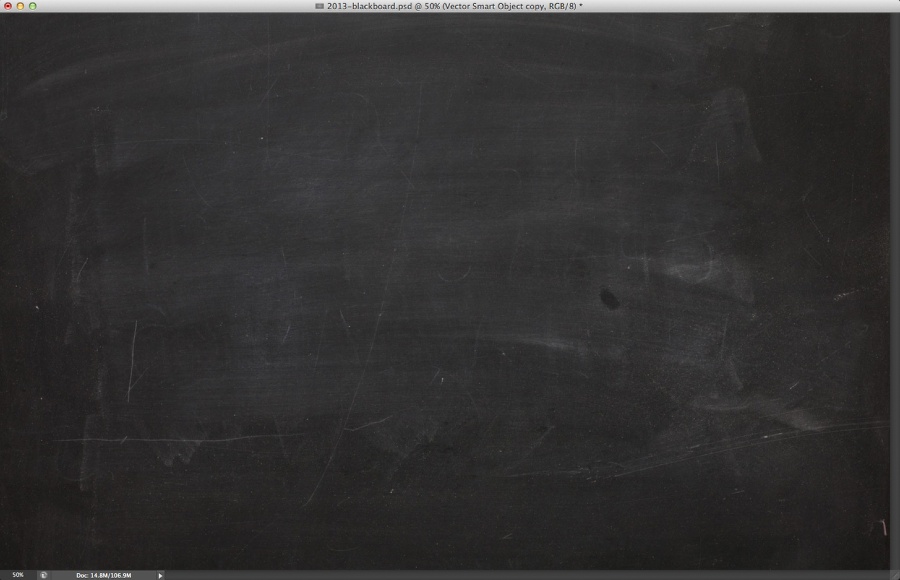
Now in Photoshop, create a new document. I am using 2880×1800 pixels. After that search for a black board image to place as background of your design.
Easy Chalk Ornament Typography in Photoshop

Step 8

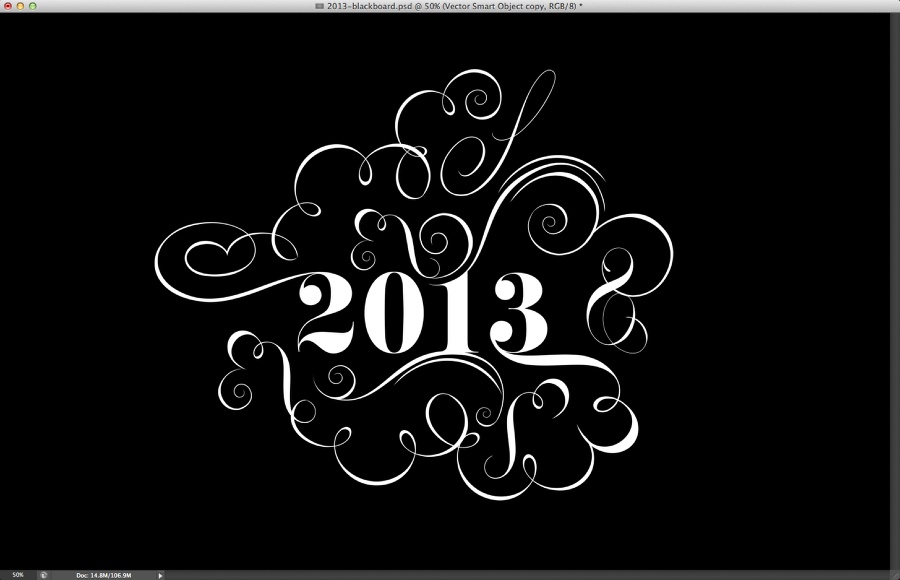
Copy the graphic you created in Illustrator and paste it in Photoshop. Also, add a layer and fill it with black. After that duplicate the 2013 graphic and merge it with the black background.
Easy Chalk Ornament Typography in Photoshop

Step 9

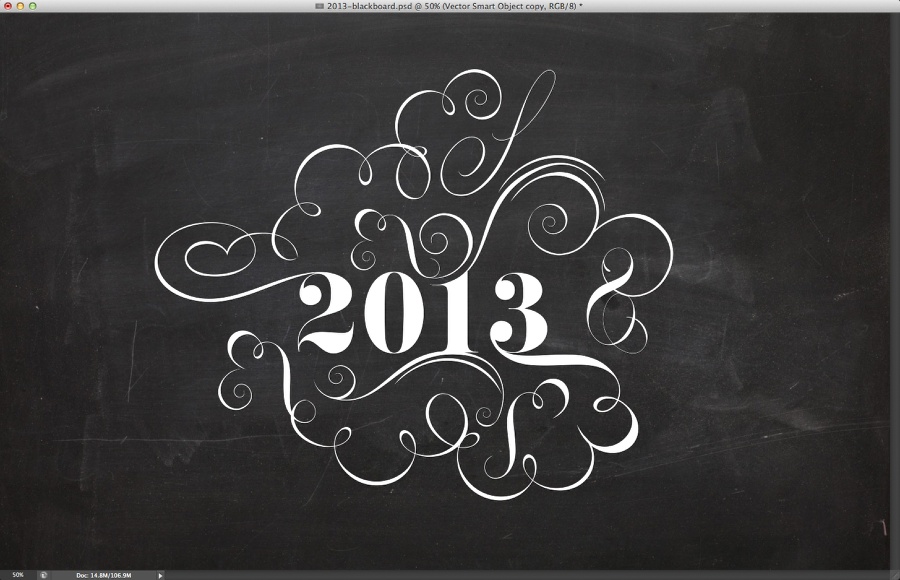
Change the Blend Mode of the merged object to Lighter Color.
Easy Chalk Ornament Typography in Photoshop

Step 10

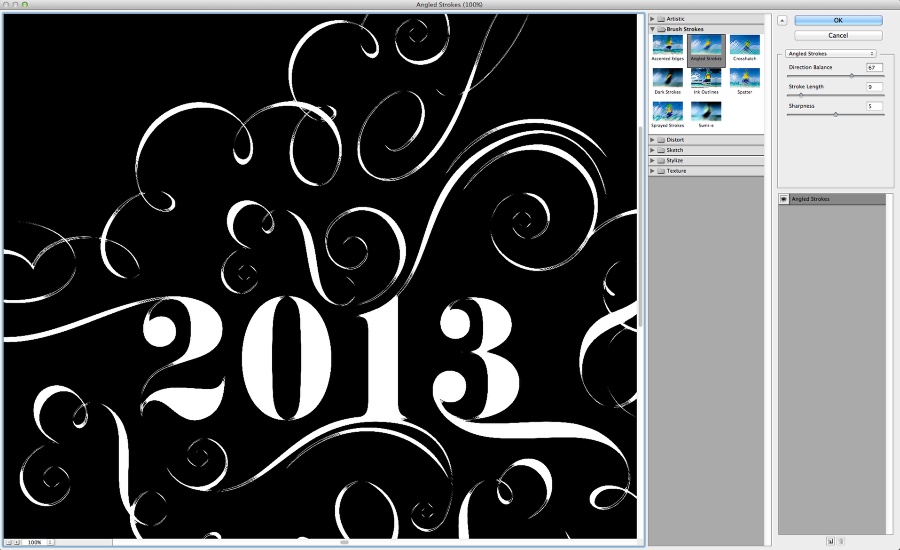
Go to Filter>Filter Gallery>Angled Stroke. Use 67 for the Direction Balance, 9 for the Stroke Length and 5 for the Sharpness.
Easy Chalk Ornament Typography in Photoshop

Step 11

Add a mask and then with the Brush Tool (B) using a textured brush, paint with 30% black on the mask to make the white less uniform.
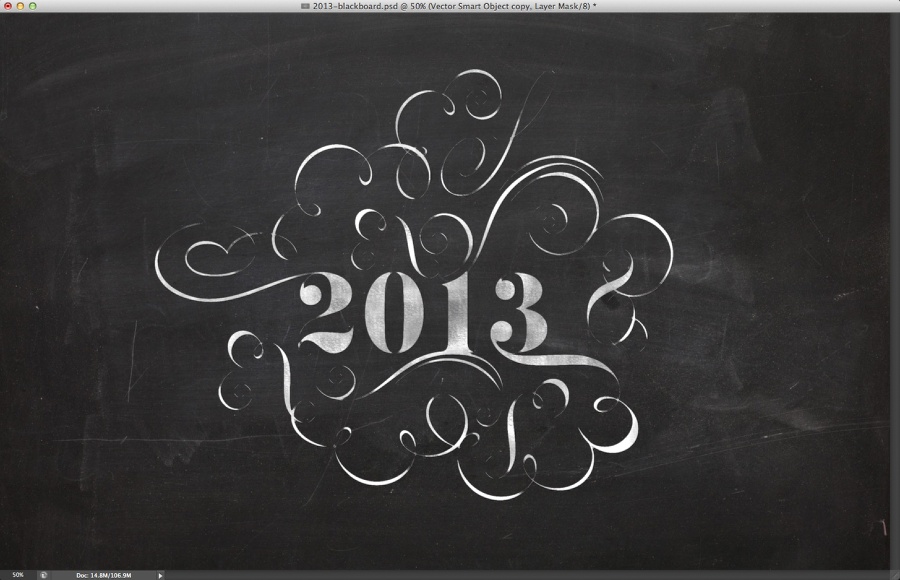
Easy Chalk Ornament Typography in Photoshop

Step 12

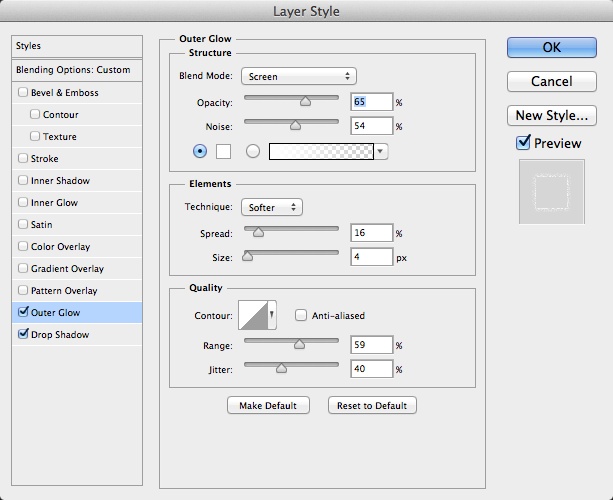
With the other layer with the 2013 graphic on top of the other layers, go to Layer>Layer Style>Outer Glow. Use the image below for the values.
Easy Chalk Ornament Typography in Photoshop

Step 13

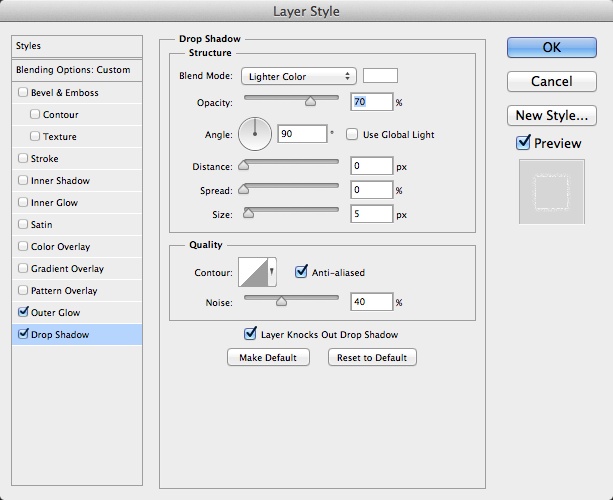
After that select Drop Shadow. The idea of these 2 layer styles is to create a sort of chalk effect.
Easy Chalk Ornament Typography in Photoshop

Step 14

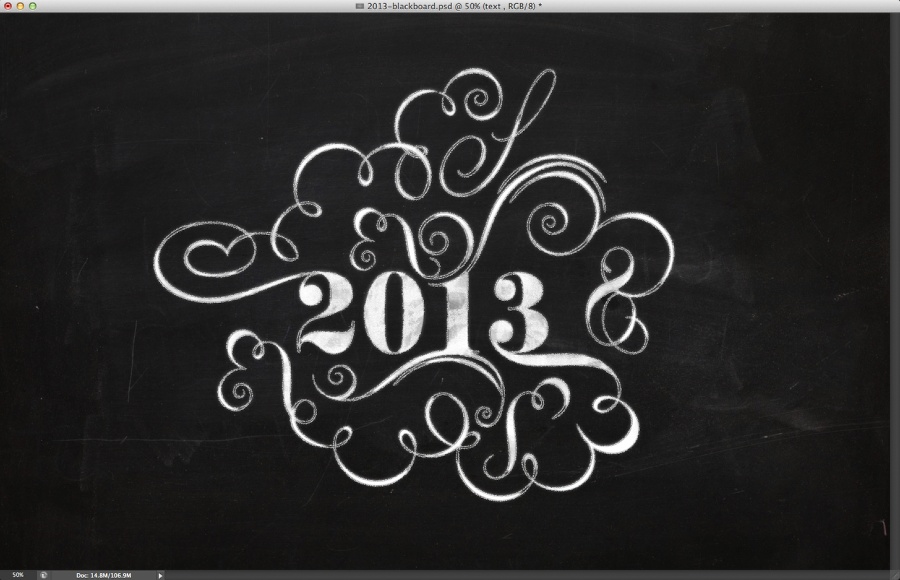
Here is the effect you might have after these steps. After that change the Blend Mode of the layer with layer styles to Dissolve.

Easy Chalk Ornament Typography in Photoshop

Step 15

Select all layers and duplicate them. Merge the duplicated layers into one and then go to Filter>Blur>Gaussian Blur. Use 5 pixels for the radius. After that change the Blend Mode to Soft Light at 50%. Duplicate the layer again and change the Blend Mode to Screen.
Easy Chalk Ornament Typography in Photoshop

Add your logo in the end and if you want you add some noise and using adjustment layers reduce the contrast. But that is up to you. The idea here was just to create a nice chalkboard effect using Photoshop and Illustrator.

Easy Chalk Ornament Typography in Photoshop

Download the Photoshop file

Download the Photoshop file used for this tutorial

Posted in Blog | Comments Off on Easy Chalk Ornament Typography in Photoshop

Daily Inspiration #1314

Daily Inspiration #1314

This post is part of our daily series of posts showing the most inspiring images selected by some of the Abduzeedo’s writers and users. If you want to participate and share your graphic design inspiration, You can submit your images and inspiration to RAWZ via http://raw.abduzeedo.com and don’t forget to send your Abduzeedo username; or via Twitter sending to http://twitter.com/abduzeedo.

Do you want to see all images from all Daily Inspirations? Check out http://daily.abduzeedo.com

alessartist

Digital art selected for the Daily Inspiration #1314

Digital art selected for the Daily Inspiration #1314

alexmalyon

Digital art selected for the Daily Inspiration #1314

arichabala

Digital art selected for the Daily Inspiration #1314

barrettbiggers

Digital art selected for the Daily Inspiration #1314

bugmango

Digital art selected for the Daily Inspiration #1314

Digital art selected for the Daily Inspiration #1314

camiloguell

Digital art selected for the Daily Inspiration #1314

Chepe Leña

Digital art selected for the Daily Inspiration #1314

Digital art selected for the Daily Inspiration #1314

Chris O’Halloran

Digital art selected for the Daily Inspiration #1314

christofernil

Digital art selected for the Daily Inspiration #1314

crisbuon

Digital art selected for the Daily Inspiration #1314

cuded

Digital art selected for the Daily Inspiration #1314

Digital art selected for the Daily Inspiration #1314

Digital art selected for the Daily Inspiration #1314

Digital art selected for the Daily Inspiration #1314

Damian “Tinox”

Digital art selected for the Daily Inspiration #1314

diegodiaz

Digital art selected for the Daily Inspiration #1314

@dollofroz Ruba alash

Digital art selected for the Daily Inspiration #1314

Digital art selected for the Daily Inspiration #1314

Digital art selected for the Daily Inspiration #1314

Emerson Brambila

Digital art selected for the Daily Inspiration #1314

Florian Fricke

Digital art selected for the Daily Inspiration #1314

Digital art selected for the Daily Inspiration #1314

floydgrey12

Digital art selected for the Daily Inspiration #1314

Fosse Nicky

Digital art selected for the Daily Inspiration #1314

gencept

Digital art selected for the Daily Inspiration #1314

Digital art selected for the Daily Inspiration #1314

Digital art selected for the Daily Inspiration #1314

Digital art selected for the Daily Inspiration #1314

Digital art selected for the Daily Inspiration #1314

Germán Benito

Digital art selected for the Daily Inspiration #1314

giu-lia

Digital art selected for the Daily Inspiration #1314

Digital art selected for the Daily Inspiration #1314

goceveleski

Digital art selected for the Daily Inspiration #1314

Digital art selected for the Daily Inspiration #1314

Hazardos Hadix

Digital art selected for the Daily Inspiration #1314

japinc

Digital art selected for the Daily Inspiration #1314

jaredtrice

Digital art selected for the Daily Inspiration #1314

Digital art selected for the Daily Inspiration #1314

kenanabdulghani

Digital art selected for the Daily Inspiration #1314

kreshnikilazi

Digital art selected for the Daily Inspiration #1314

Leonardo Ugalde

Digital art selected for the Daily Inspiration #1314

lilterra

Digital art selected for the Daily Inspiration #1314

Ludovic Cordelières

Digital art selected for the Daily Inspiration #1314

maheshartist

Digital art selected for the Daily Inspiration #1314

Digital art selected for the Daily Inspiration #1314

Digital art selected for the Daily Inspiration #1314

Maja Vuckovic

Digital art selected for the Daily Inspiration #1314

Digital art selected for the Daily Inspiration #1314

mariookharsa

Digital art selected for the Daily Inspiration #1314

mormorik

Digital art selected for the Daily Inspiration #1314

Digital art selected for the Daily Inspiration #1314

moustafa-noby

Digital art selected for the Daily Inspiration #1314

niel quisaba

Digital art selected for the Daily Inspiration #1314

ninapalomba

Digital art selected for the Daily Inspiration #1314

Ondrej Hruby

Digital art selected for the Daily Inspiration #1314

patricklanda

Digital art selected for the Daily Inspiration #1314

renduh

Digital art selected for the Daily Inspiration #1314

Roberto Perrino

Digital art selected for the Daily Inspiration #1314

samnd

Digital art selected for the Daily Inspiration #1314

Shawn M Darst

Digital art selected for the Daily Inspiration #1314

Sisth

Digital art selected for the Daily Inspiration #1314

talesofarsenicandlace

Digital art selected for the Daily Inspiration #1314

thaeger

Digital art selected for the Daily Inspiration #1314

Digital art selected for the Daily Inspiration #1314

Tim Fox

Digital art selected for the Daily Inspiration #1314

Digital art selected for the Daily Inspiration #1314

Digital art selected for the Daily Inspiration #1314

triangularboy

Digital art selected for the Daily Inspiration #1314

Veronica Neira

Digital art selected for the Daily Inspiration #1314

wa55up

Digital art selected for the Daily Inspiration #1314

youareinthecircle

Digital art selected for the Daily Inspiration #1314

Digital art selected for the Daily Inspiration #1314

Digital art selected for the Daily Inspiration #1314

Posted in Blog | Comments Off on Daily Inspiration #1314