8 Essential iPad Apps for Bloggers

Advertise here with BSA

Before I begin, let me just say what this list is, and what it isn’t. It’s not just a random set of iPad apps that can, but on the ther hand, don’t have to turn out to be that useful to you. I also didn’t want to give you countless alternatives for a specific single aspect of blogging.

Instead, I’ve tried to take a broad look at blogging as a profession and point out a set of apps that will simply allow you to do your work smoothly and with better effectiveness.

(By the way, I actually use these apps myself.)

Also, I will try to keep this as low budget as possible, but not everything is free. Even though the digital world of today allows us to get quite a lot of quality for no cost at all, sometimes investments need to be made if we want to make our work easier.

1. Blogsy
blogging tools

Let’s start with the main app for bloggers. You might be surprised that it’s not WordPress, but there’s actually something a lot better than the official app. Blogsy isn’t free, but it’s just a minor investment ($4.99).

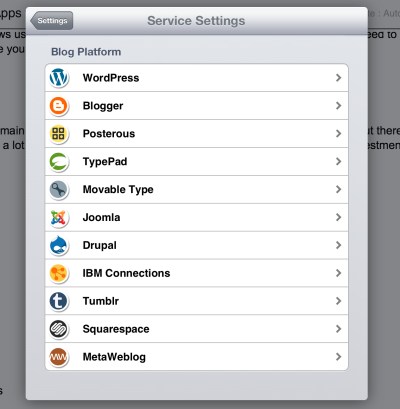
The app allows you to write posts using a clear an usable interface, and then send them out to a number of publishing platforms including: WordPress, Blogger, Posterous, Typepad, Joomla, and more (image below). However, the biggest strength of this app is the possibility to create new posts offline and to do it in a clear and easy to grasp manner.
blogging tools

Of course, all standard text formatting features are available, and you can also include videos, pictures, links, and content from other platforms on the Internet. In the end, this is the most important app on this list. Without it your blogging would be a lot more difficult.

By the way, I’m using it right now to create this very post.

2. WordPress
blogging tools

Okay, time for the official app. Even though Blogsy is better for doing the actual blogging, the official app can still come handy. Besides, it’s free.

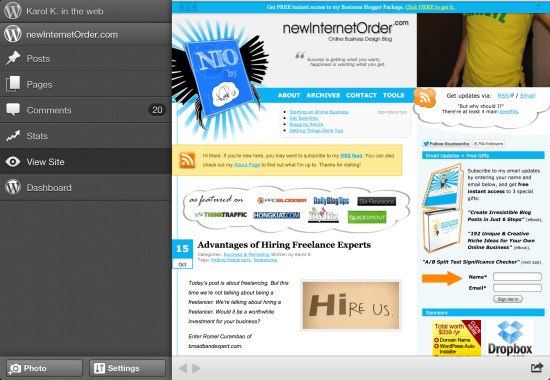
The main value of this app lies in its possibility to edit whatever has already been published on your blog. This includes posts, pages, and comments. There’s really no better way of moderating comments than through this app.

You can also use Blogsy for updating your live posts and pages, but from my experience, it just creates a big mess in your Blogsy files, so I don’t advise it.

3. Aviary
blogging tools

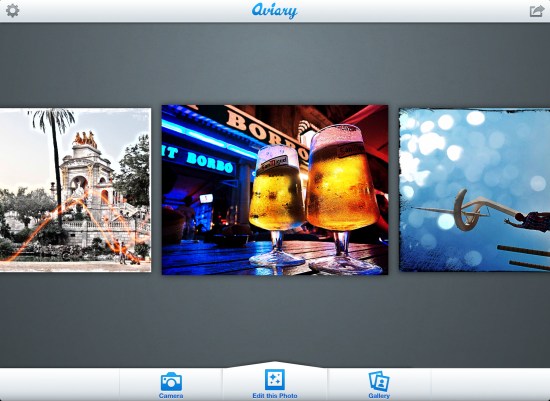
Aviary was one of the most popular online photo editing apps (before it went through a major direction change, so to speak). This is the iPad version of the main app. Both Blogsy and WordPress allow you to include photos in your blog posts, but the photo editing capabilities of these apps are not that great. Aviary does a much better job at it, and it’s free.

Some features Aviary has to offer: auto enhancement, orientation, cropping, brightness, contrast, hue, saturation, sharpness, red-eye removal, and more (image below).
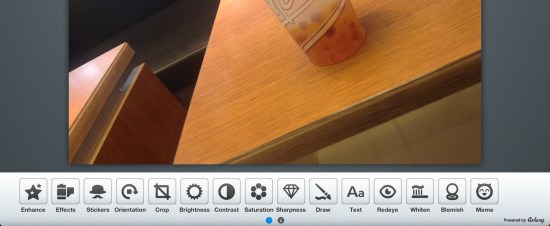
blogging tools

Aviary takes photos from your camera roll or allows you to shoot new ones. Once you’re done editing, the new version of the image is saved back to your camera roll. Then you can upload it through Blogsy or WordPress.

4. MindMeister

blogging tools

Mind mapping is a great way to organize your thoughts, plans, strategies, and post ideas. If you don’t know what mind mapping is then feel free to visit Wikipedia, which does quite a good job at explaining it.

Mind mapping isn’t the most difficult thing to do on a standard PC, but on an iPad it becomes even easier. When you have the multitouch and drag and drop interface at your disposal you can make your work truly effortless. Plus, the tool itself is very easy to use, offers quite a lot of interesting features, and it’s free.

You can create an unlimited number of mind maps, synchronize them through the online interface of MindMeister.com, and even export them to other mind map formats, or standard PDF and PNG files.

5. Teed
blogging tools

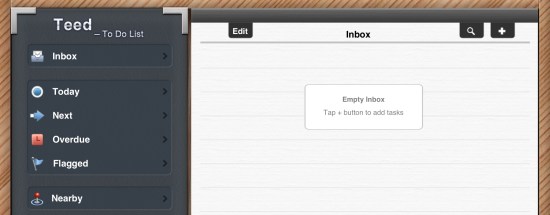
It’s time for the first productivity app on this list. In essence, Teed is a to-do list management app. But what’s great about it (other than the fact that it’s free) is that it’s in tune with GTD – one of the most popular time and work management methodologies.

Even if you’re not using GTD, you can still benefit from this app a lot. It has a clear interface, and all the features you’d need, including: the possibility to work on multiple projects, prioritize, set notifications, tagging, password protection, modify the app badge, and much more.

6. Analytics
blogging tools

It’s probably about time to mention an app for tracking your performance and web stats. There are many paid solutions out there, but one of the best ones is still free – it’s Google Analytics (no surprise here).

As far as I know, there’s no decent Google Analytics app for the iPhone, but the one for the iPad lets you in on almost the complete set of features your Analytics profile has to offer. You can track multiple profiles (sites) and look at your stats from every possible angle (your audience, traffic sources, popular content, conversions, and so on).

7. Google Drive
blogging tools

Quite simply, this app gives you access to all your Google Docs files. It’s free and (kind of) offers you everything the full online version does. I’m saying kind of because, for some reason, you can’t edit the spreadsheets. I guess this is something the next versions will fix.

Other than that, this app is the complete package. You can browse your documents, create new ones, edit them, and share them with other users.

8. Dropbox
blogging tools

I’m sure that your iPad isn’t the only device where you keep your content and do your work, so a service like Dropbox can surely come handy for you. What’s important about this app is that it grants you access to your online Dropbox account.

I’m sure you’re familiar with Dropbox itself – the online disk space and platform that keeps your files synchronized between every computer you own.

The important thing is that it’s not like a standard Dropbox app (the desktop one). It doesn’t create a folder on your iPad and automatically synchronize everything in it. This app is only a clearer interface to access your online account, through which you can download each file individually.

You can also upload pictures and videos directly from the app itself. Plus, if you install additional apps (like Documents), you can link them to Dropbox and upload other files as well.

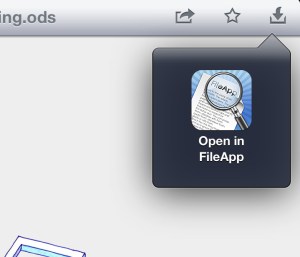
When it comes to viewing your files, Dropbox has some basic capabilities to view images and text files, but for other types of files it’s good to install additional apps like FileApp, for example.
blogging tools

This closes my list of 8 essential iPad apps for bloggers. Feel free to let me know what you think and also point out other apps you find useful.

Posted in Blog | Comments Off on 8 Essential iPad Apps for Bloggers

Copyright hell: toy and packaging design ripoffs

ThumbnailWhen I walk into a design studio, there are several things I know I’ll see; tattoos, piercings and toys… lots and lots of each. Why do designers, as well as non-creatives, love toys?

We love toys because they are the first art form to which we are introduced, they bring back a comforting feeling of simpler times in our lives, a certain nostalgia, not receiving the presents we wanted as children (which we can now afford for ourselves), and they’re just damn fun! If you look at designer’s portfolio sites, they often reflect the design and feel of our favorite toys.

 Designer vinyl toys have become big business and big bucks. 1980s Godzilla kaiju figures go for a small fortune and the sale of my own collection financed my divorce, as hard as it was to say good-bye to those wonderful pieces and hand the money to a lawyer.

There is, however, a way to enjoy the art and comfort of great toys on a budget. Like the cereals at the supermarket that have odd names like “Admiral Munch,” “Fruit Toots” or “Lunatic Lickers” for which the box character will go “bloody and totally insane,” there are toys that may not be “Transformers” or “Star Wars.”


These cereal boxes are legitimate usage but, in every case, the original manufacturer sells the interior product for secondary sales. So, if you can do without the brand name, you might as well enjoy a crunchy bowl of Coco Loco.

It’s not the names that really matter if you’re going to put these budget toys on your desk… it’s the cool factor people want. So what if the “Princess Leime” slave girl figure is packaged under the label “Star Whores”, who’s to know when she’s leaning against your computer? Sure, these gems in the rough won’t be found in your local toy store. A trip to a Chinese gift store or a dollar store is a step into the wondrous world of bootleg booty! Like the non-brand name cereals, it’s the same stuff, using the same molds, same formula but the ripped off toys won’t rot your teeth. If you are going to take it out of the package, then who but you will know? And, in that, is the big problem.

There are several downsides to bootlegged toys and packaging as well as the very practice. Firstly, it means some factory in some country isn’t obeying the international copyright law and the stores that sell them are aiding the pirating of licensed material. The second problem, as you’ll see from the examples shown in this article, is that if you’re a collector, you may be buying a fake and that will cost you money many years after you purchased it and are trying to sell it for the tidy sum toys bring on ebay.

It’s not a problem that’s limited to just toys. The fashion industry has been plagued by bootlegs from certain countries for decades. Even the fast food and packaged foods industries are affected.

How can you bootleg Steve Jobs? Well, someone did it. Perhaps the problem is completely out of hand when you can steal a personality?

Most bootleg toys are absolutely ridiculous, which is part of their charm but if you’ll note the price tag on the “Star Raiders” package (an obvious Star Wars ripoff), it’s from a major American toy retailer. While they carry the legitimate Star Wars line of products, are they thumbing their nose at the proper manufacturer by carrying products from pirating manufacturers? Despite that, is Spiderman with a machine gun damaging the true Marvel Comics brand as well as lopsided Captain America? The Woody bootleg, labelled as “Space Boys 3″ is just frightening with his gorilla arms. Toys like these can be found in stores that specialize in “overage stock” but it’s not really overage.

“Add-ons” are a unique clue to a bootleg toy. The manufacturer, which has the mold for the legitimate toy, mixes another licensed toy within the package and usually comes up with a similar name for the final product. Certainly “Superheroic Man” would fool DC Comics, a subsidiary of Warner Bros. and their army of lawyers. The horse is a nice touch for extra play value. Why fly when you can ride? Although why ride a horse when you can ride a dinosaur?

Spiderman dressed as Huckleberry Fynn is about the weirdest example of add-ons I’ve ever seen although the Harry Potter Batmobile (or Pottermobile, in this case) is a far reach from the JK Rowling vision of a wizarding world that has no GAP, iPods or TV sets. Transforming Donald Duck is übercool but if a company like Disney/Pixar can’t stop the pirating of their licensed properties, then what hope is there for any property, artwork or design?

The practice is really very easy. The factories already have the molds, so it’s just a matter of running a few million extra pieces when a run is ordered by the legitimate property owner and then repackaging the toys and selling them to another foreign market. When I lived in New York City, I would often search shops in Chinatown for toys such as these, which has led to a very large collection of things like “Robert Cop” and “Specialman”. I don’t know if the actor, James Spader, has licensed himself onto the toy market.

No corporation is apparently safe from this practice. Nintendo, Hasbro, Bandai and even LEGO have been bootlegged.

 When a factory has both the toy mold AND the style guide art from the license owner, that’s where the trouble begins for toy collectors. Unless you are careful about looking for the right copyright information, you may get stuck with a fun but worthless investment. The same goes for fashion shoes, handbags, jewelry, watches, baby products and so on and so forth. Many U.S. retailers are reporting receiving shipments of products that have conflicting serial numbers, otherwise, the products and packaging looks perfect.

The end result, aside from no assurance of the brand and safety issues they promote with their products, is a loss of income for the nation’s corporations as their sales are replaced by factory direct sales and all that cash generated goes right into the pockets of another country. During the recent presidential election, aside from threats and lies passing quickly, there was just a little mention of foreign trade. It’s a problem that the U.S., as well as other nations haven’t truly addressed and if Disney/Pixar and Warner Bros. are unable to stop or even slow this bootlegging practice, then what hope is there?

But how does this affect me as a designer, you may ask? Too often, your design elements may be lifted off the internet and used on the packaging of these products. If your negotiated rights are exceeded, you will lose income as well as possibly taking the blame from your client and losing future income from other projects. So, what can you do about it? Very little, except turn down work that promotes copyright theft here in your own country. When a client demands you use art or designs they found on the internet, inform them about the copyright law and when they laugh in your face, smile, turn around and walk quickly to your computer where you can report them to the proper copyright holder.


Do you collect bootleg toys? Have any stories about your own work being bootlegged? Share your story in the comments.

Unique, Friendly Cubano Font (all weights + webfont) – only $12!

Source

Posted in Blog | Comments Off on Copyright hell: toy and packaging design ripoffs