Swiss Typography Style Posters

Swiss Typography Style Posters

These posters were designed by graphic designer Mike Joyce inspired by his love of punk rock and swiss modernism. Mike redesigned many rock show flyers into international style posters. Each design is set in lowercase berthold akzidenz-grotesk medium (not helvetica). Every single one of these shows actually happened.

To view the entire poster collection visit Swissted.com.


The International Typographic Style, also known as the Swiss Style, is a graphic design style developed in Switzerland in the 1950s that emphasizes cleanliness, readability and objectivity. Hallmarks of the style are asymmetric layouts, use of a grid, sans-serif typefaces like Akzidenz Grotesk, and flush left, ragged right text. The style is also associated with a preference for photography in place of illustrations or drawings. Many of the early International Typographic Style works featured typography as a primary design element in addition to its use in text, and it is for this that the style is named.


To view the entire poster collection visit Swissted.com.
Posted in Blog | Comments Off on Swiss Typography Style Posters

Photoshop CS6 Cheat Sheet

Advertise here with BSA

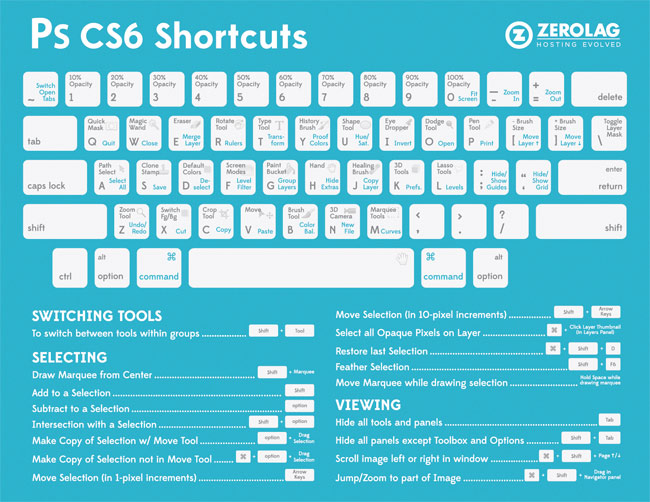
Photoshop is one of the preferred tools of web designers, and like any other tool that is used over and over, it’s important to optimize one’s workflow by using keyboard shortcuts. So the good people at ZeroLag have put together a super handy Photoshop CS6 cheat sheet exclusively for WDL.

How to Read the Keyboard Shortcuts Key:

Photoshop Tool Shortcut = grey text

Action Shortcut = blue text

  1. Look for the Photoshop Tool Shortcut (grey text) or Action Shortcut (blue text) that you want to perform on the keyboard.
  2. If you want to use a Photoshop Tool Shortcut (gray text), press on the corresponding key. (Example: To access the “Type” Photoshop Tool, press the letter “T” key)
  3. If you want to use an Action Shortcut (blue text), hold down the Command key, then press on the Action Shortcut key you want indicated in blue text. (Example: To access the “Transform” Action Shortcut, hold down the Command key and press the letter “T” key)

How to Perform Other Shortcuts Not on the Keyboard:

Follow the indicated keys/actions next to the specific shortcut you want to perform. (Example: To “Switch Tools” hold down the Shift button while pressing a Photoshop Tool Shortcut, always indicated in grey text.)

Photoshop Cheat Sheet

Posted in Blog | Comments Off on Photoshop CS6 Cheat Sheet