Since WP 3.1, we’ve had post formats. Most people don’t know what that is and most developers don’t make use of this great tool.
You should know about it since we’ll probably have a great increase on post formats usage with the upcoming WP 3.6 version. There we’ll find a better post formats UI, and certainly a big incentive for users to understand and use it accordingly.
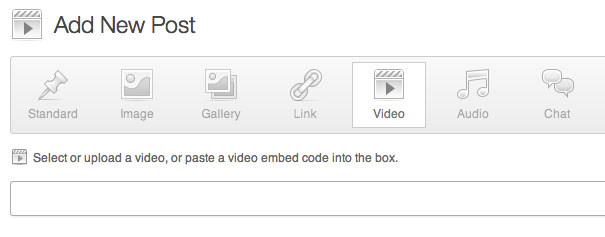
Post Formats vs. Custom Post Types
Post formats allows you to select how the content should behave and display, without modifying the content type itself. So in spite of the different presentation they are all in the same big group: posts. They’ll show in the same feed and are supposed to be read as the same kind of content.
Custom post types on the other hand are more suitable, for the cases where you need different sections, you don’t want to mix those with your regular posts. The real difference here is the use, Custom Post Types are completely separated and should be used whenever you want to store any kind of content that isn’t supposed to be read by the user as posts (like portfolios, e-commerce orders, products and so on).
You can see the Post Formats as a standardized way to categorize content. So as a theme developer you’ll know for sure that items created using the “video” post format will display in a certain way, which is much better than styling a “video” category differently.
Here they are:
- Aside – The kind of short content, that don’t need to have a title
- Gallery – A lot of grouped images
- Link – A link and a description
- Image – Worth a thousand words
- Quote – A quotation (not necessarily inspirational, a testimonial, for example would fit well here)
- Status – Twitter-like messages
- Video – Embedding a video
- Audio – Embedding audio
- Chat – Chat transcript (an interview, IM chat…)
Since they are born to be a standard you just can’t add new post formats. It wouldn’t make a lot of sense to create a standard that can be changed, right?
Setting it up
To activate it you’ll need to add a piece of code in your functions.php, like this:
add_theme_support('post-formats',
array( 'aside', 'gallery','link','image','quote','status','video
','audio','chat' ) );
And once you’ve done that you’re ready to rock.
It’s important to mention that you could only accept a few of them. If you theme don’t have a special format for aside, for example, you don’t need to activate it.
Using post formats
Once you’ve declared support to it, you’ll need to actually use it in your loop. There’s a simple conditional function to test the post format, the has_post_format() this is a simple example using it:
if( has_post_format(‘image’)){
   the_post_thumbnail(‘large’);
   the_title();
}
Here you’ll show a bigger thumbnail when you have an image post format. That is cool because when you use the image post format that’s what you’re looking for: to show your images.
WordPress also gives us the ability to modify it in the CSS. As many other classes, WordPress creates new conditional classes for post formats, so you can style them (if the PHP part isn’t enough, or if you are using a theme and don’t want to mess up the code).
This code is an example:
.format-status .post-title{
   display: none;
}
If you have a “status” post format you’ll mostly don’t need your title, so this will hide the entire (probably styled) post-title container.
Taking it to the next level: get_template_part
If you have completely different ways to style your post formats, you could use the get_template_part function to call new files so you can reuse it afterwards and you can also define a default file that will be called if the named file doesn’t exist. This loop will do so:
while(have_posts()) : the_post(){
   get_template_part(‘content’,get_post_format());
}
So for each post format it’ll call the content-POSTFORMATNAME.php file in your theme’s root. The good thing is that if you don’t have all the files, it’ll load the content.php file by default so you can avoid breaking your theme using a lot of different conditional includes.
Summing up
What do you think about post formats? Have you seen a good theme using it? Are you planning to use it? Let us know using the comments section!


